'%3e%3cpath%20id='stem'%20d='M50,4C51,4%2052.4,5%2052.8,5.8C53,8.5%2052.8,12.5%2052.4,14.8C52.2,15.5%2051.7,15.9%2050.9,15.9L49.2,15.9C48.4,15.9%2047.9,15.5%2047.8,14.8L47.5,6.2C48,5.4%2049,4.4%2050,4Z'%20style='fill:rgb(2,103,193);fill-rule:nonzero;'/%3e%3cpath%20id='leaf'%20d='M55.4,12.5C57.2,11%2062.254,9.359%2065.789,10.737C69.999,12.377%2070.7,15.3%2071.2,16.8C69.8,17.7%2067.4,18%2065,18C61.3,17.8%2058.3,15.5%2055.4,12.5Z'%20style='fill:rgb(2,103,193);fill-rule:nonzero;'/%3e%3cpath%20id='left-flesh'%20d='M50,15.8C46.7,15.6%2043.2,16.2%2040.1,19.3C37.3,21.9%2035.6,27.1%2033.2,32.9C31.8,36.6%2029.7,40%2027,43.6C21.8,50.8%2018.9,59.3%2018.9,66.1L39.9,62.3C40.6,55.5%2048,44%2050,41.3L50,15.8Z'%20style='fill:rgb(239,160,11);fill-rule:nonzero;'/%3e%3cpath%20id='right-flesh'%20d='M50,15.8C53.3,15.6%2056.8,16.2%2059.9,19.3C62.7,21.9%2064.4,27.1%2066.8,32.9C68.2,36.6%2070.3,40%2073,43.6C78.2,50.8%2081.1,59.3%2081.1,66.1C81.1,72.853%2078.902,79.423%2074.838,84.816L57.525,71.138C59.375,68.875%2060.4,65.75%2060.1,62.3C59.4,55.5%2052,44%2050,41.3L50,15.8Z'%20style='fill:rgb(214,81,8);fill-rule:nonzero;'/%3e%3cpath%20id='blue-base'%20d='M18.9,66.1L39.9,62.3C39.3,69.2%2044,74.8%2050,74.8C53,74.8%2055.675,73.4%2057.525,71.138L74.838,84.816C68.961,92.614%2059.764,97.2%2050,97.2C32.824,97.2%2018.9,83.276%2018.9,66.1Z'%20style='fill:rgb(2,103,193);fill-rule:nonzero;'/%3e%3c/g%3e%3c/svg%3e)

Software has gone agentic in the last couple of years. We are all well versed in writing, testing, and maintaining traditional, deterministic code, but now we also have non-deterministic apps to tend to.
At first it sounds straightforward, but slowly you hit the wall of text. You realize that investigating, debugging, planning, and fixing take a lot of reading, and your AI keeps sending more of it your way. This becomes unmanageable really quickly, even if you instruct the AI to be less verbose or to draw more diagrams.
One particular pain point I have seen with my customers is going through logs or agent traces, looking for an issue. That issue is often buried in one span or message, inside a trace with hundreds of spans, in a batch with hundreds of traces. Yes, you could use AI to do the investigation, read the wall of text that it spits out, and choose to trust the diagnosis. Or you could get your hands dirty and dig through the traces yourself.
Rendering the data accurately
Most of the observability tools out there over-index on the structural accuracy of the trace data. They render a trace as a tree with every single span listed, and show each span’s content and metadata as JSON. Some tools go further. They format the JSON, show the messages as plain text, or add a graph of the flow.
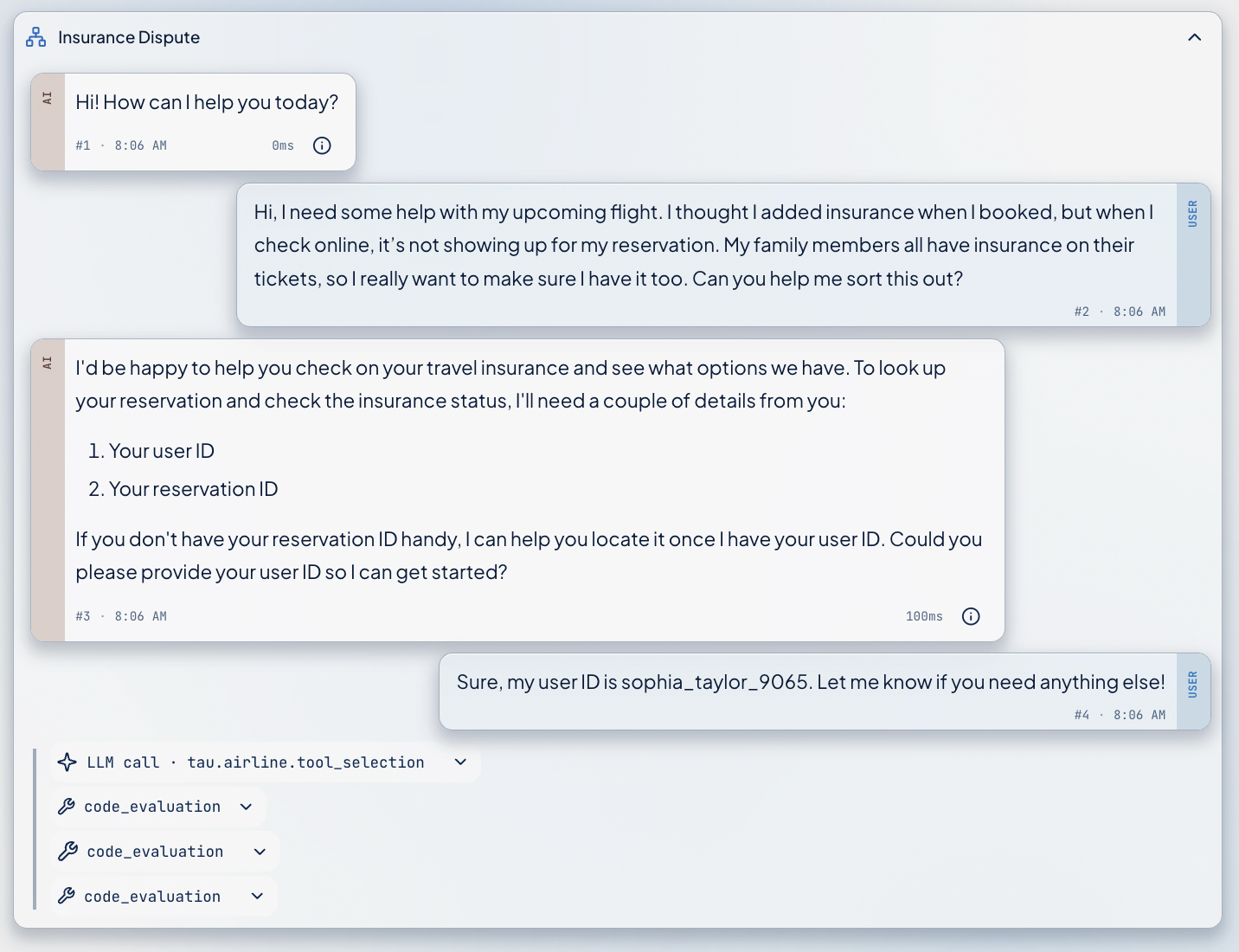
The same public airline run in three trace viewers. Select an image to see the full capture.
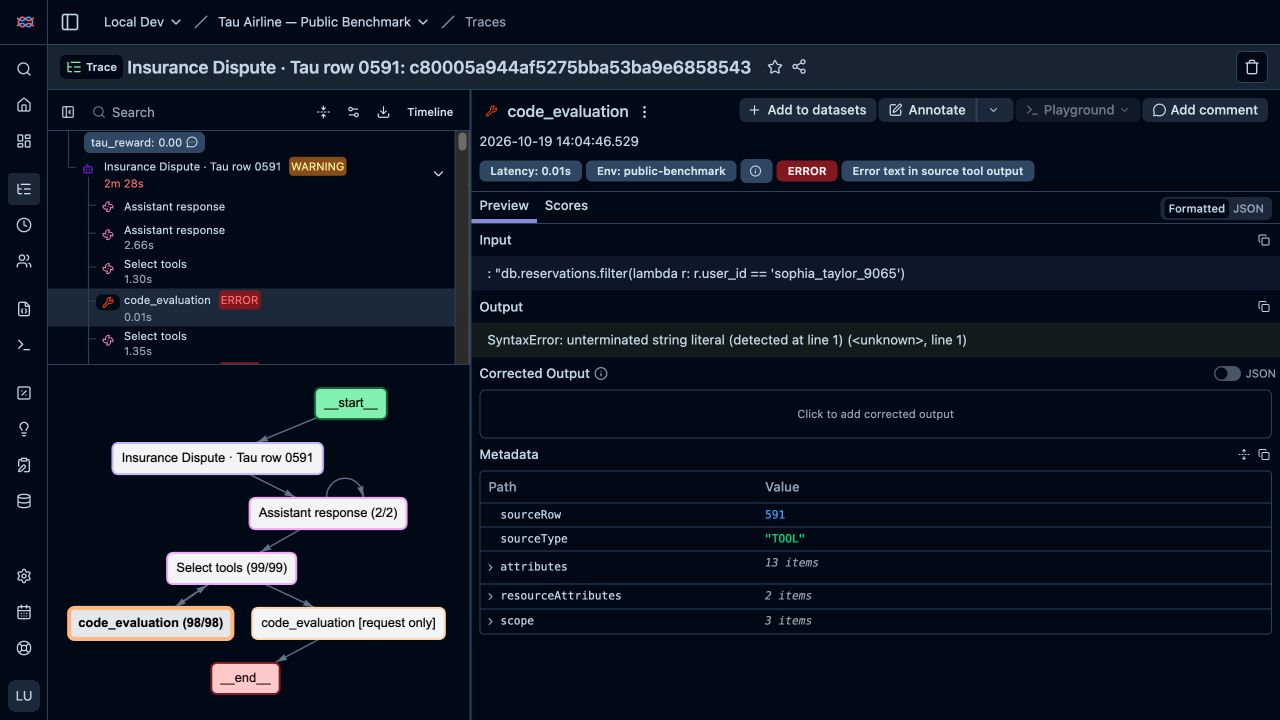
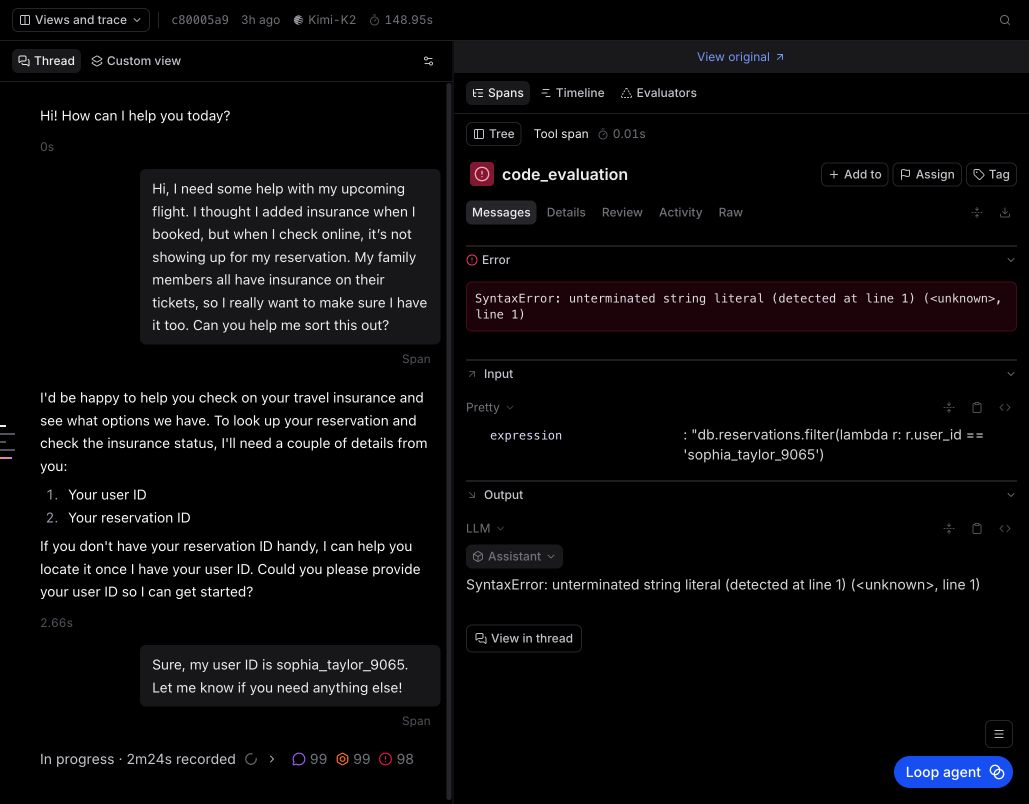
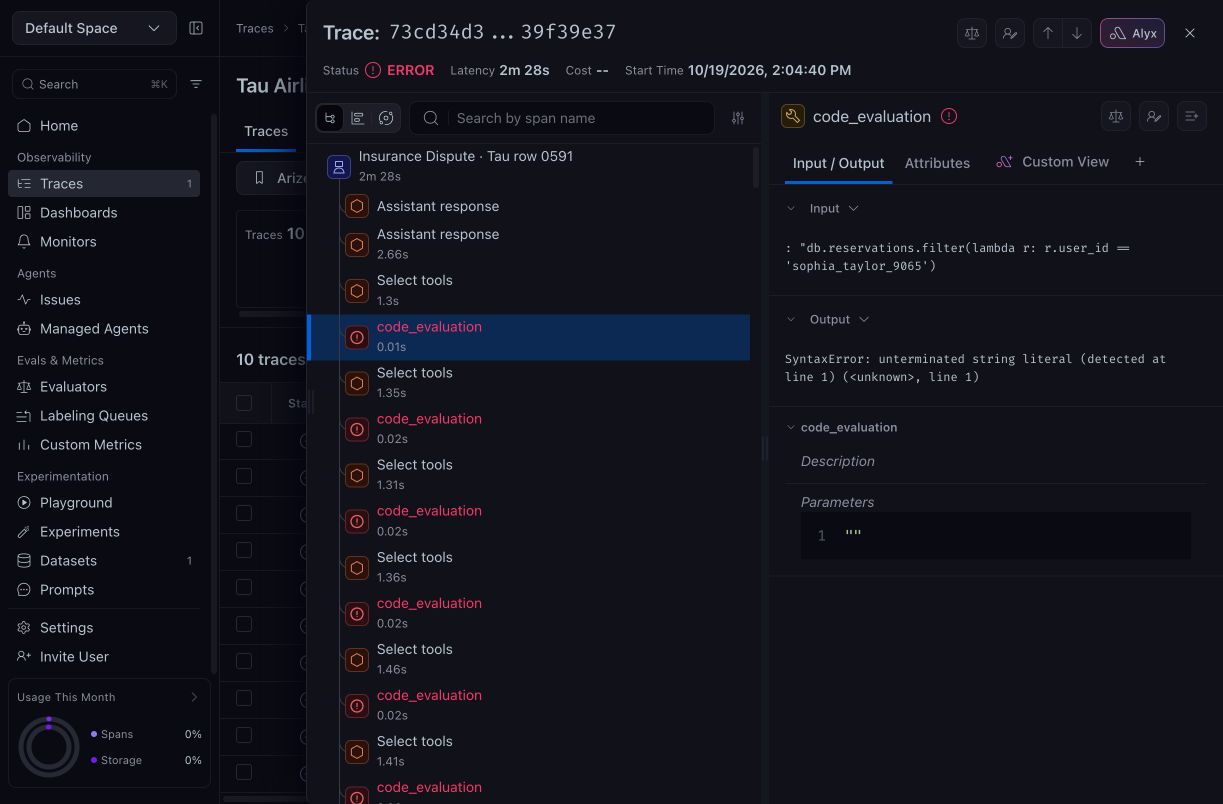
Cropped views captured October 19–20, 2026, using Snorkel AI’s public Tau² airline benchmark with synthetic user information. These are examples of the captured views, rather than a product-wide ranking.
Braintrust, for example, shows the conversation next to the span evidence, and Langfuse groups repeated calls in its graph. These help you navigate.
Yes, an accurate representation that follows the underlying data structure is important. But it does not help much when you are trying to figure out what is going on across hundreds or thousands of traces and find what is broken. This gets even worse with multi-agent setups, where the work moves between agents and the trace becomes a graph rather than a simple tree.
A familiar conversation, with less to read
People are used to reading conversations in chat apps like iMessage and WhatsApp, or on social media. Can we not simplify the conversation between a user and an agent, and render it in a similar way? Some tools already do, and Papaya’s Detail view does too. Yes, you lose some of the structure, but you get a familiar interface that your brain already knows, and that helps.
But a chat layout alone is not enough. You still have to search through a long list of messages, and that is not ideal. That’s where we need information compression, to reduce the cognitive load of reading all those messages, however simple they look. Without actually reducing the amount of information, a better layout can only help so much.
Revealing the detail gradually
Papaya takes the approach of summarizing the agent conversation, and thus reducing it to high-level steps, while preserving the control flow. These trace summaries appear as simplified steps, or milestones, in the conversation.
A summary is an interpretation, so every step links back to the spans it came from. The user can always drill down and check the evidence.
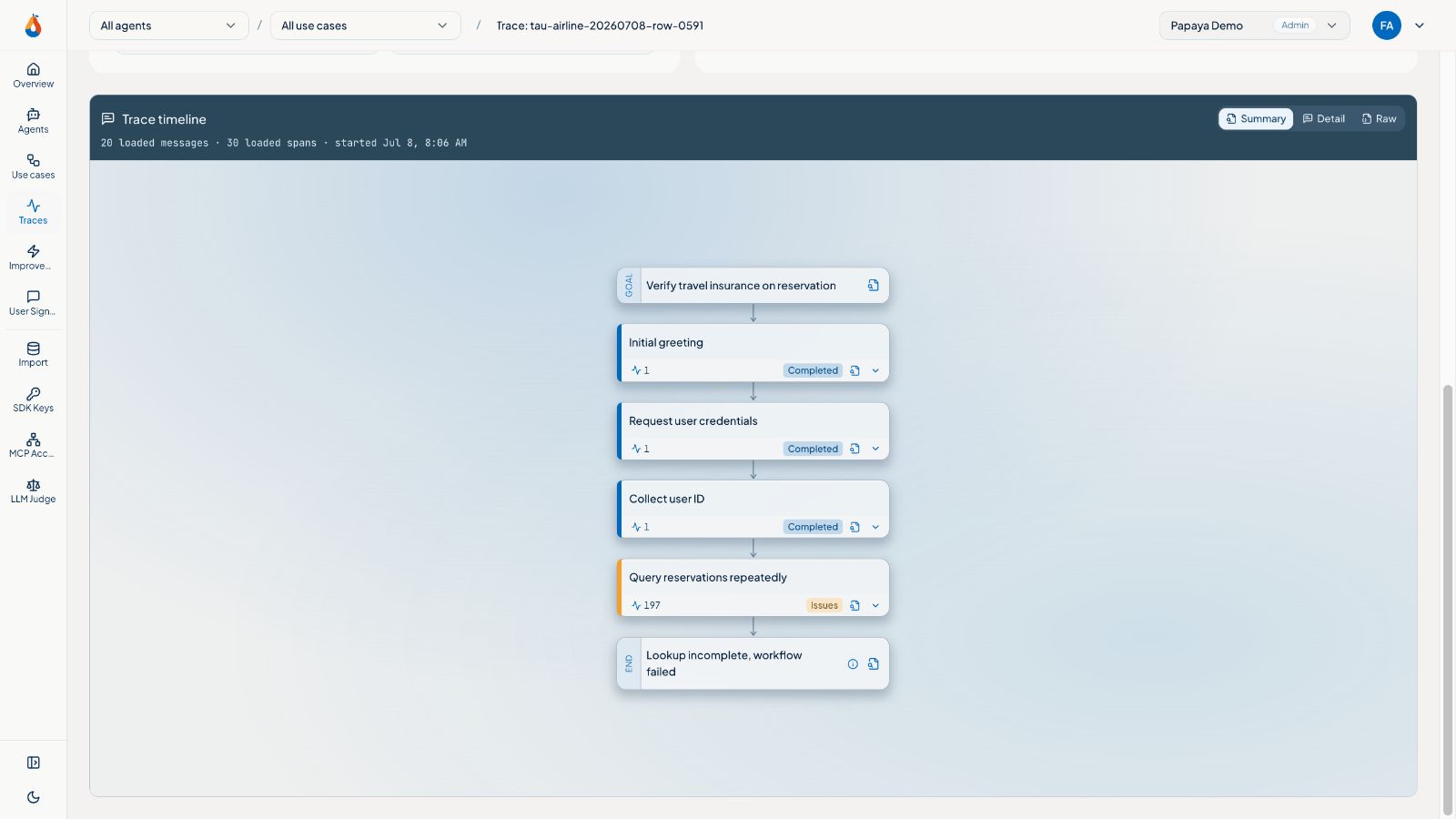
So when users open a trace in Papaya, they first see an overall summary of what happened. They can quickly scan the 3 to 10 summary steps and understand the run. Then they can drill down into any step, or into the ones highlighted as errors.
Clicking a step shows a longer description, and from there they can jump to the exact span. The display switches to the detailed trace view and scrolls to that span.
The complexity is not hidden. It is revealed gradually, as the user explores the areas they care about.
Making AI output easier to consume
With AI, we can write code or generate vast amounts of information and insight at will. But inspecting that output demands our attention. That creates cognitive load, and cognitive load creates friction in adopting AI.
AI can definitely do a better job if it has better context and understands you better. It might speak in visuals or math, if that is what you are more comfortable consuming. But until that is the norm, we have to take deliberate steps to reduce information complexity, like we are doing for trace viewing in Papaya.
If your team spends hours reading agent traces to find one bad tool call, I would like to see that trace. Send it to us, and we will show you what it looks like as a Papaya summary.
Related